

Instructions for Campus Wireless Network (Wi-Fi)
Instructions for Campus Wireless Network (Wi-Fi)
National Sun Yat-sen University Campus Wi-Fi Overview (Outline)
1. Wi-Fi Signals (SSID) Overview
-
SSID for Next-Gen Campus Wi-Fi:
-
TANetRoaming(Domestic inter-institutional roaming, web login) -
eduroam(International roaming, encrypted connection)
-
2. Login Account Types
-
NSYSU Faculty, Staff, and Students:
-
Faculty & Staff: Please log in using your SSO username and password.
-
Students & Alumni: Please log in using your Student ID / Course Selection password (Example:
b012345678/123456).
-
Account & Password Lookup: NSYSU SSO Login
-
-
Visitors / Guests:
-
Members of the Inter-institutional Roaming Project should log in using their home institution's full username and password.
-
3. Login Methods
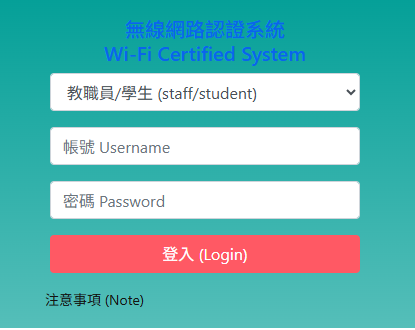
Method 1 (Suitable for all users): Web Login
Connect to the TANetRoaming access point. If your browser does not open automatically, open it manually, and you will be redirected to the authentication page.
Method 2 (NSYSU Faculty, Staff & Students Only): Encrypted Connection
Connect to eduroam and log in using your NSYSU SSO credentials or Course Selection password.
Contact & Support
-
Smart Operations Division: (07) 525-2000 #2513
-
Email: lsf@mail.nsysu.edu.tw
-
Report an Issue: NSYSU LIS Problem Report